Fully Automatic Loading
1.Introduction to Fully Automatic Loading
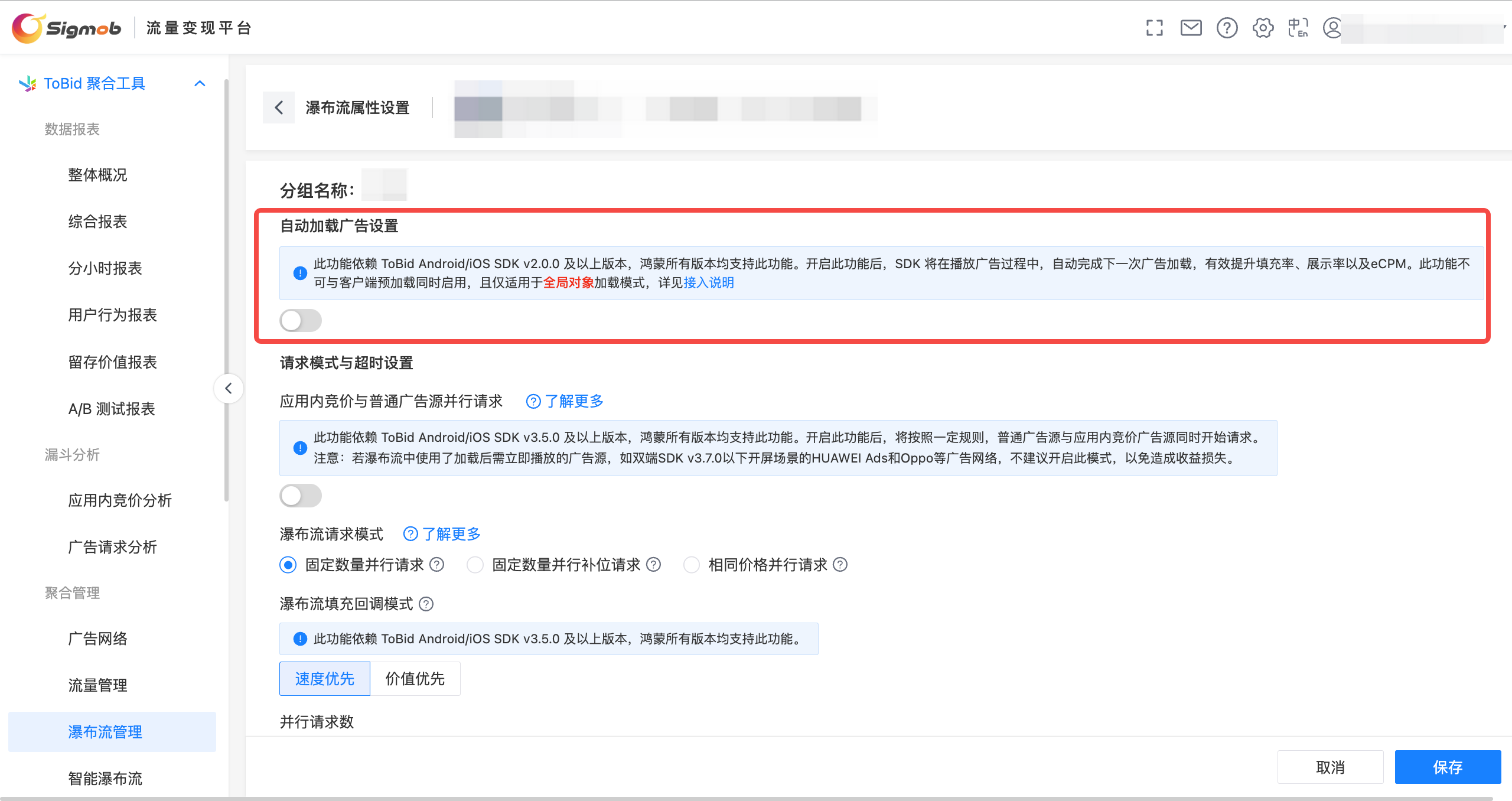
After enabling this feature, the SDK will automatically load the next advertisement during the process of playing the current ad, which can effectively improve fill rates and eCPM.
| Ad Type | Dependency on ToBid Version Number |
|---|---|
| Reward Video | above 2.0.0 |
| Interstitial Ad | above 2.0.0 |
| Native Ad | above 2.14.0 |
This feature is only applicable to the loading mode of globally calling the advertising component. If you enable this feature and encounter a significant decrease in impression rate, please check if the request mode in your code supports this feature.
2. The path to toggle the feature
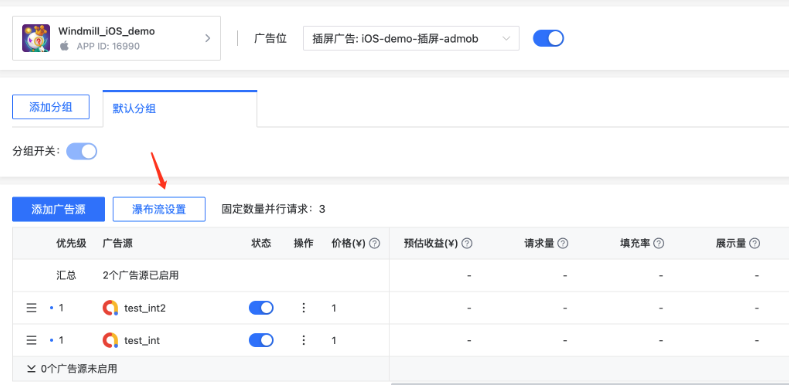
After selecting the app and ad position in the "Waterfall Management" section, click "Waterfall Settings" on the page to enter the waterfall settings page.
In the waterfall settings page, enable "Automatic Ad Loading" to activate the feature.
3. Implementation Principle
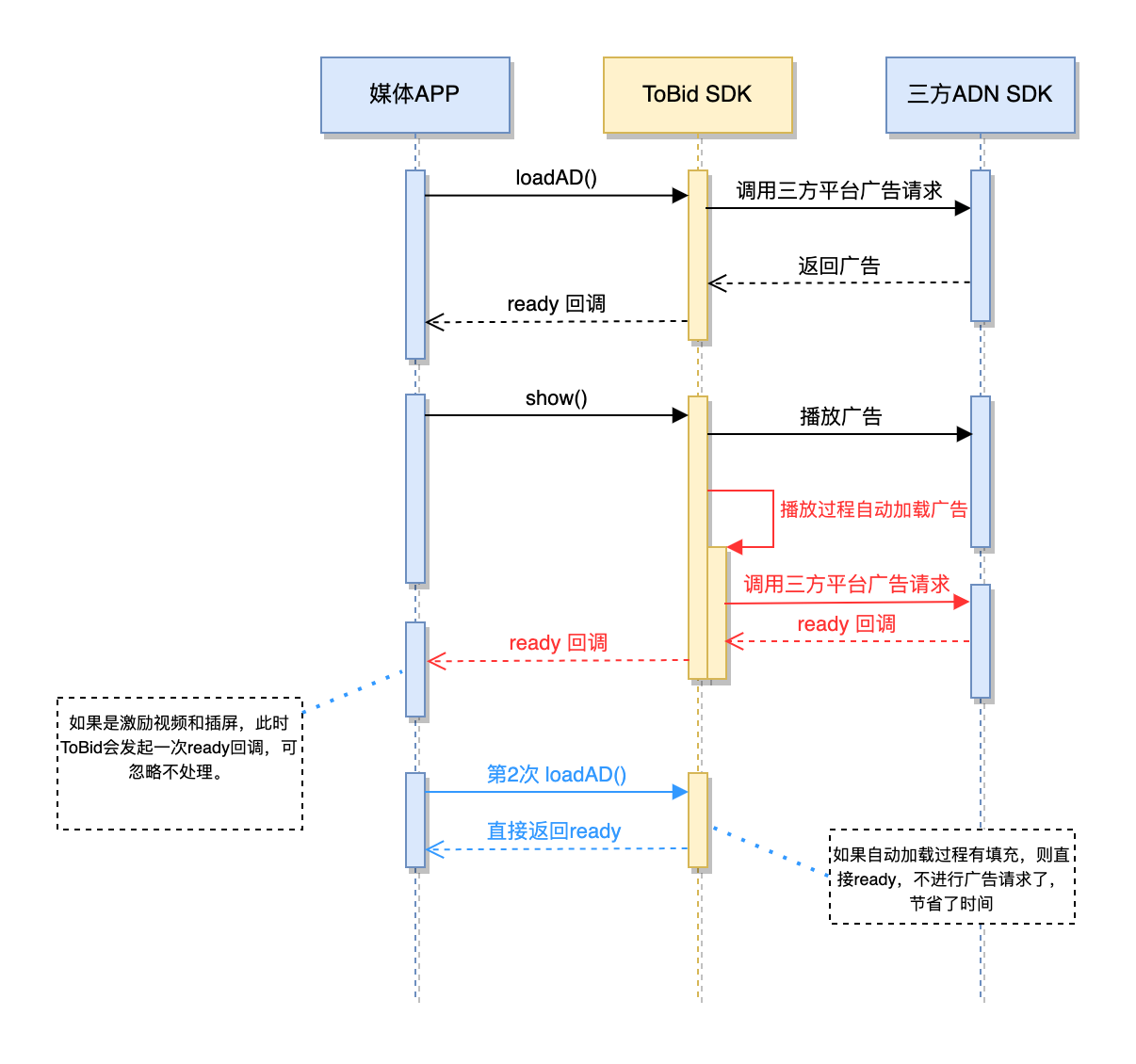
When an ad is automatically loaded, it will automatically request the third-party advertising platform upon exposure and cache the ad information after it is filled. For rewarded videos and interstitial ads, the ToBid SDK will also initiate a "ready" callback, which the media can ignore.
When the media initiates an ad request again, the ToBid SDK will check if there is a cached ad available and whether it is valid. If the cached ad is valid, it will not send an ad request to the third-party advertising platform and will immediately return. It will also send a "ready" callback notification, saving time on ad request and loading.
4. Notice
In rewarded videos and interstitial ads, the automatically loaded ads will also trigger the "ready" callback, and developers need to pay attention to handling it. It is important to note that the "ready" callback event of the automatically loaded ad should not be used to play the ad, to avoid conflicts with the currently playing ad.
The scope of the automatic loading mechanism is limited to the ad instance object. Developers need to maintain the created ad instance object for the automatic loading mechanism to work effectively. If a new ad instance object is created before each call, the automatic loading mechanism will not work correctly.
5. Code Example
Recommendations for Code Handling in Real-time Loading: If the previous approach was to call show within the ready callback, then you need to set up a new variable and assign values to it in two separate callbacks: one for ad display and another for ad close. When calling show, you should check this variable and only call show if the ad is in a closed state.
5.1 iOS
Reward Video
- For each ad unit ID, an instance object of WindMillRewardVideoAd is created, and the preload logic between multiple instance objects does not interfere with each other.
WindMillAdRequest *request = [WindMillAdRequest request];
request.userId = @"user_id";
request.placementId = @"4432322913755475";
//The rewardVideoAd global object should not be re-instantiated (using new) every time, as this will prevent the preload functionality from working properly.
if (self.rewardVideoAd == nil) {
    self.rewardVideoAd = [[WindMillRewardVideoAd alloc] initWithRequest:request];
}
self.rewardVideoAd.delegate = self;
[self.rewardVideoAd loadAdData];
Native Ad
- When an ad starts playing, the ToBid SDK will automatically execute the logic for loading the next ad. However, the result of the automatically loaded ad will not immediately trigger a callback to the developer indicating success or failure. The developer needs to call the loadAdData interface again. If there is a fill for the automatically loaded ad, then this loading attempt will immediately trigger a callback to the developer indicating successful ad loading.
- WindMillNativeAdsManager creates an instance object for each ad unit ID, and the preload logic between multiple instance objects does not interfere with each other.
WindMillAdRequest *request = [WindMillAdRequest request];
request.placementId = @"4432322913755475";
request.userId = @"user_id"
//The nativeAdManager global object should create an instance for each ad unit ID.
if (self.nativeAdManager == nil) {
    self.nativeAdManager = [[WindMillNativeAdsManager alloc] initWithRequest:request];
}
self.nativeAdManager.delegate = self;
self.nativeAdManager.adSize = CGSizeMake(320, 0);
[self.nativeAdManager loadAdDataWithCount:1];
Interstitial Ad
- WindMillInterstitialAd creates an instance object for each ad unit ID, and the preload logic between multiple instance objects does not interfere with each other.
WindMillAdRequest *request = [WindMillAdRequest request];
request.userId = @"user_id";
request.placementId = @"4432322913755475";
//The interstitialAd global object should not be re-instantiated (using new) every time, as this will prevent the preload functionality from working properly.
if (self.intersititialAd == nil) {
    self.intersititialAd = [[WindMillIntersititialAd alloc] initWithRequest:request];
}
self.intersititialAd = self;
[self.intersititialAd loadAdData];
5.2 Android
Reward Video
private WMRewardAd mRewardAd;//全局对象

/**
 * 加载广告
 */
private void loadAd() {

  if (mRewardAd == null) {
      mRewardAd = new WMRewardAd(this, new WMRewardAdRequest(placementId, userID, options));
  }

  mRewardAd.setRewardedAdListener(new WMRewardAdListener() {
    ......
  }
  mRewardAd.loadAd();
}

/**
 * 展示广告
 */
 private void showAd(){

  if(mRewardAd.isReady()){
    mRewardAd.show(activity,options);
  }else{
    loadAd();
  }

 }
Native Ad
- After the native ad is automatically loaded successfully, it will not notify the media immediately, but will return the preloaded ad immediately when the media calls loadAd again (provided it is the same WMNativeAd object).
private WMNativeAd nativeAd;//global obj
private WMNativeAdRequest request;

/**
 * 加载广告
 */
private void loadAd() {

  if(nativeAd == null){
    request = new WMNativeAdRequest(PLACEMENT_ID, USER_ID, AD_COUNT, OPTIONS);
    nativeAd = new WMNativeAd(this, request);
  }

  nativeAd.loadAd(new WMNativeAd.NativeAdLoadListener() {
    @Override
    public void onError(WindMillError error, String placementId) {

    }

    @Override
    public void onFeedAdLoad(String placementId) {

    }
  }
}
Interstitial Ad
private WMInterstitialAd mInterstitialAd;;//全局对象

/**
 * 加载广告
 */
private void loadAd() {

  if (mInterstitialAd == null) {
      mInterstitialAd = new WMInterstitialAd(this, new WMInterstitialAdRequest(placementId, userID, options));
  }

  mInterstitialAd.setInterstitialAdListener(new WMInterstitialAdListener() {
    ......
  }
  mInterstitialAd.loadAd();
}

/**
 * 展示广告
 */
 private void showAd(){

  if(mInterstitialAd.isReady()){
    mInterstitialAd.show(activity,options);
  }else{
    loadAd();
  }

}