Segment
1. Introduction to Segment
Different segments can be configured with different waterfall settings. Developers can segment traffic based on different rules according to actual traffic conditions, enabling fine-grained operations.
2. Rule Description
2.1 Adding Segmentation to the Waterfall
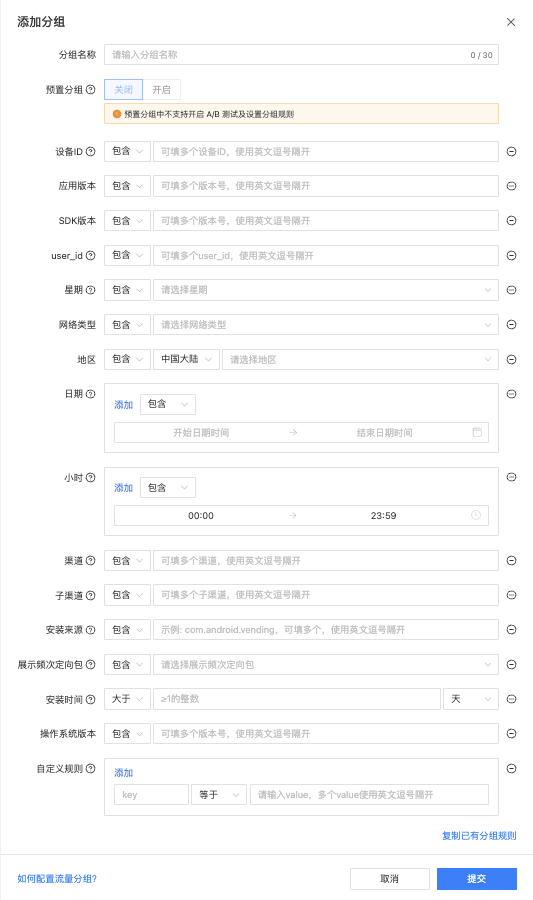
2.2 Rule Description
| Rule | Condition | Description | Demo |
|---|---|---|---|
| App Version | Include,Exclude | You can fill in multiple versions, separated by commas | 1.100,1.107 |
| SDK Version | Include,Exclude | You can fill in multiple vesions, separated by commas | 3.5.0 |
| Device ID | Include,Exclude | You can fill in multiple device IDs, separated by commas. Android supports: GAID, OAID, IMEI. iOS supports: IDFA. | 28968E75-E7BE-4AA2-BFA0-C455DD74C111 |
| IDFA | Include,Exclude | only ios | Has IDFA |
| User ID | Include,Exclude | The ID that identifies the user within the App user system (similar to a game account), can be passed in through the SDK user_id method, optional parameter | 1234567890 |
| Network Type | Include,Exclude | options: wifi、5G、4G、3G、2G | 5G |
| Region | Include,Exclude | For selecting global traffic, only the national/regional dimension is supported, and it does not support drilling down to the provincial level. | China, Japan |
| Device Type | Include,Exclude | only ios, options: iphone,ipad | iphone |
| Channel | Include,Exclude | Developer custom information, passed in by calling the SDK method. The platform fills in the passed value here. Supports multiple entries, separated by commas. | |
| sigmob | |||
| Sub Channel | Include,Exclude | Developer custom information, passed in by calling the SDK method. The platform fills in the passed value here. Supports multiple entries, separated by commas. | |
| sigmob | |||
| Custom Rule | Include,Exclude | Developers can use custom rules to handle user tags that are temporarily unsupported by ToBid for segment. After passing in the Key-Value conditions of custom rules through the SDK custom rules interface, you can configure the rules on the platform. Custom rules are marked with a blue background in the waterfall rule list. Do not enter the following special characters: \t, \n, | , ~. |
| Install Time | >,< | The installation time rule relies on ToBid SDK version 2.7.0 and above. Developers can use the time obtained by ToBid or pass in the installation time through the initialization method.Selecting natural days refers to the period from the installation date to the request date, with the default time zone being Beijing Time. | |
| OS Version | Include,Exclude,>,< | You can fill in multiple vesinos, separated by commas | 13.5.0 |
| Date | Include,Exclude | If the date on which the user requests an ad falls within the set date range, this segment condition is met. Multiple date ranges can be set, and meeting any one of them satisfies the condition. The time zone is UTC+8 | 2023-07-13 00:00 ~ 2023-07-22 23:59 |
| Hour | Include,Exclude | If the hour at which the user requests an ad falls within the specified hour range, this segment condition is met. Multiple hour ranges can be set, and meeting any one of them satisfies the condition. The time zone is UTC+8 | 00:00~04:04 |
| Week | Include,Exclude | If the date on which the user requests an ad falls on the specified day of the week, this segment condition is met. The time zone is UTC+8 | Sunday |
3.3 Introduction to Using Custom Rules
ToBid supports developers in extending the settings to create custom grouping conditions. Developers can invoke SDK methods to pass in custom attributes based on their business needs. Additionally, in the custom segment rules section on the ToBid platform, developers can configure the corresponding custom rules. The ToBid server will then perform traffic matching based on the rules set by the developer. Currently, it supports logical operations including equals (=) and does not equal (!=), and a single custom key supports multiple values, for example, age=18,20&gender!=male.
3.3.1 Method for Setting Custom Rules
- Android
Map<String, String> customMap = new HashMap<>();
customMap.put("user_source", "huawei");// 流量安装来源:oppo、华为等,开发者自己传
customMap.put("channel", "toutiao");// 买量渠道:穿山甲、快手、sigmob等
customMap.put("sub_channel", "toutiao");// 买量子渠道:穿山甲、快手、sigmob等

WindMillAd.sharedAds().initCustomMap(customMap); // App的自定义规则为全局设置,对全部Placement有效- iOS
** NSDictionary *customData = @{**
**	@"user_source": @"Apple Store", // 流量安装来源**
**	@"channel": @"穿山甲", //**买量**渠道**
**	@"sub_channel": @"穿山甲", // 买量子渠道**
**};**
**
**[WindMillAds initCustomGroup:customData];
3.3.2 Preset Custom Rules Key
In the custom rules of ToBid SDK, the following key-value pairs are preset:
| Key | Des |
|---|---|
| channel | Developers can customize their user acquisition channel information and pass it in by calling the SDK method. |
| sub_channel | Developers can also customize their user acquisition sub-channel information and pass it in by calling the SDK method. |
| user_source | To identify the source of installation for the app, developers need to first pass in the information through the custom rules of the SDK. |
To prevent string parsing errors, custom rule values are prohibited from being passed in. \t ~ | \n
4. Use Segment
4.1 Default
The system will automatically create a default segment for each aggregated ad slot. This group cannot be edited, deleted, or disabled, and represents all traffic requests from the developer's app. In the absence of other rules, all traffic requests will hit the waterfall configuration of this group.
If multiple segment are created under the same aggregated ad slot, and none of the group rules match the traffic characteristics (such as version number, device ID, region, etc.), the default group will be used as a fallback strategy for ad delivery.
4.2 Rule
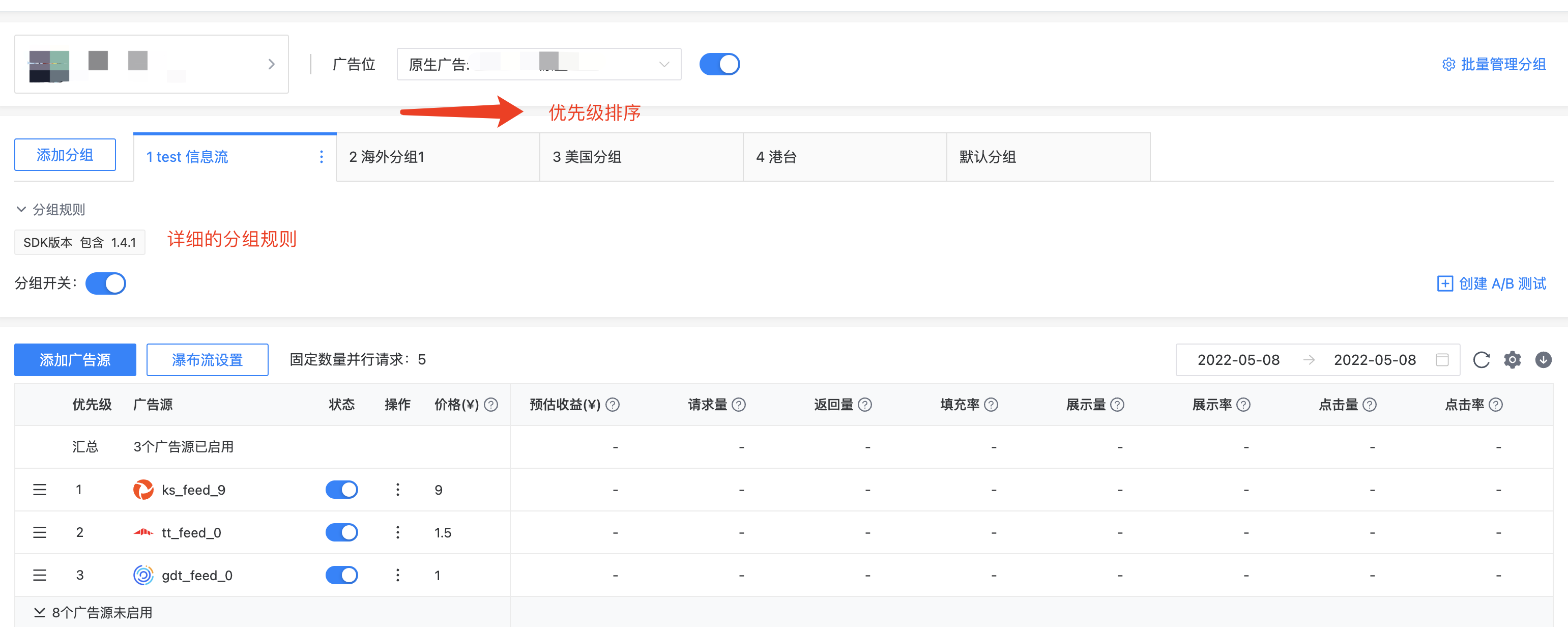
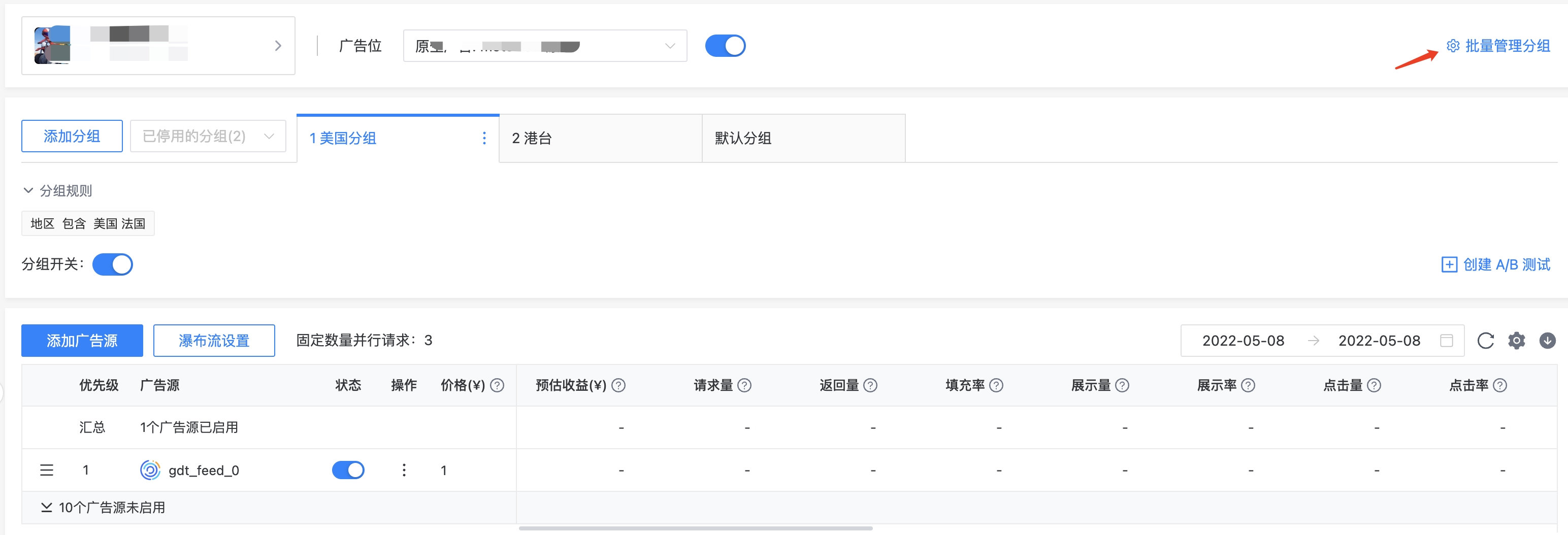
- When creating multiple segment for an aggregated ad slot in the waterfall, each segment will have a priority. The prefix number in the segment name represents the priority, with the highest priority on the left and decreasing in priority from left to right. When multiple segments are matched simultaneously, ToBid will return the waterfall configuration of the segment with the highest priority.
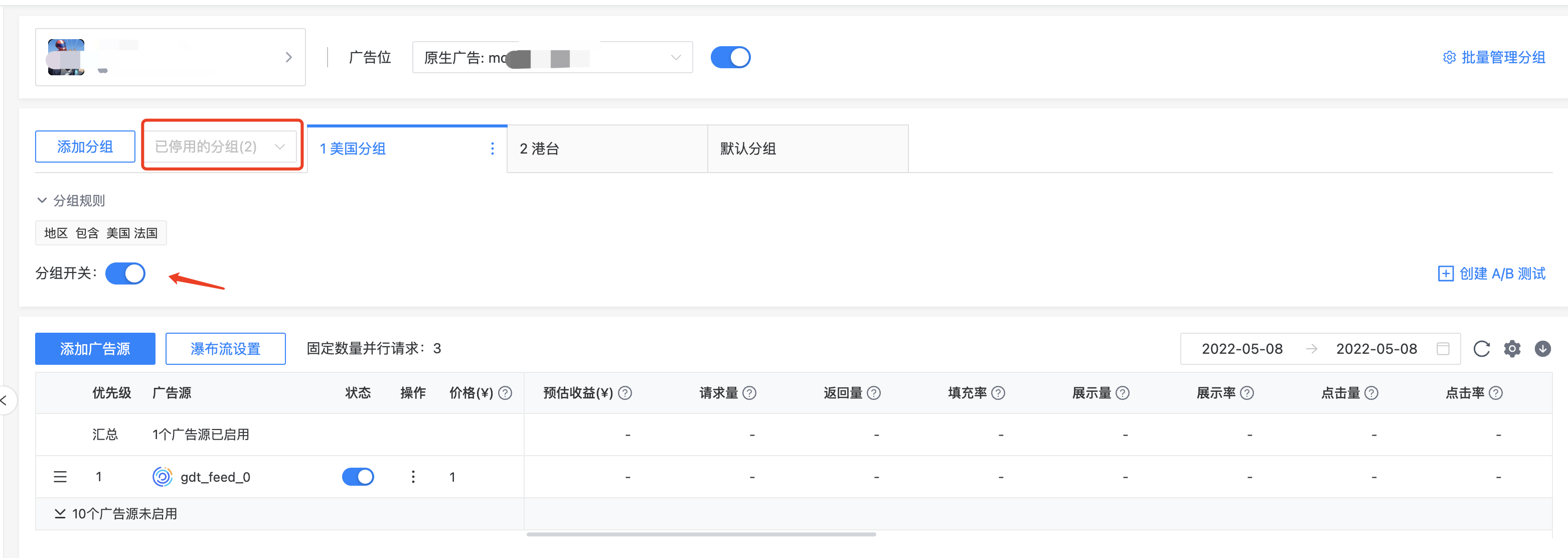
- If a created segment needs to be temporarily disabled, you can click the toggle button within the page to perform the disable operation. The disabled segment will be displayed in the "Disabled Groups" section and can be selected for viewing using the dropdown menu. Meanwhile, the server will no longer perform rule evaluations for the disabled group and will not deliver the corresponding waterfall configuration.
4.3 Batch Segment Management
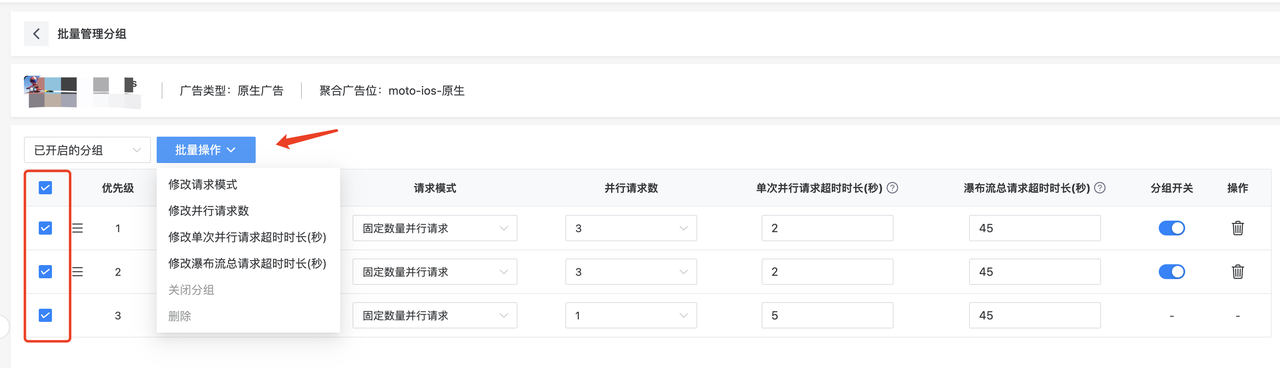
- On the waterfall management page, click "Batch Manage Groups" to view the corresponding waterfall configurations for all created segments, such as the timeout duration, number of parallel requests, and other general configurations.
- On the batch manage groups page, you can select from the dropdown list to choose between enabled groups and disabled groups. You can also directly drag and drop the groups to adjust their priority.
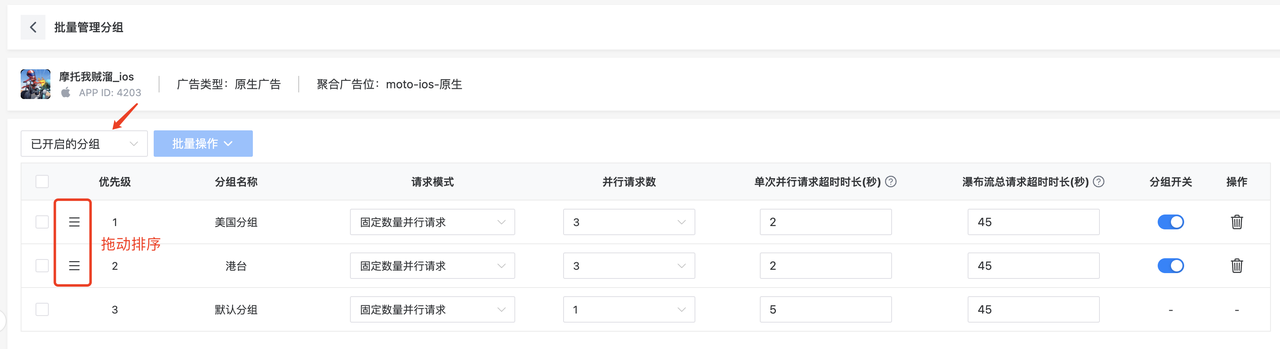
- By checking the segments, you can select the desired actions for batch modifications.