广告抓包
Advertisement capture
Charles安装教程
Charles Installation Tutorial
抓包工具介绍:Charles(HTTP代理服务器),简称”花瓶”
Introduction to packet capture tools: Charles (HTTP proxy server), also known as "vase"
Charles是一个抓包工具是一个HTTP代理服务器,HTTP监视器,反转代理服务器,当浏览器连接Chares的代理访问互联网时.Chares可以监控浏览器发送和接收的所有数据。
Charles is a packet capture tool that is an HTTP proxy server, HTTP monitor, and reverse proxy server. When a browser connects to Charles' proxy to access the Internet, Charles can monitor all data sent and received by the browser.
1.下载安装
Download and install
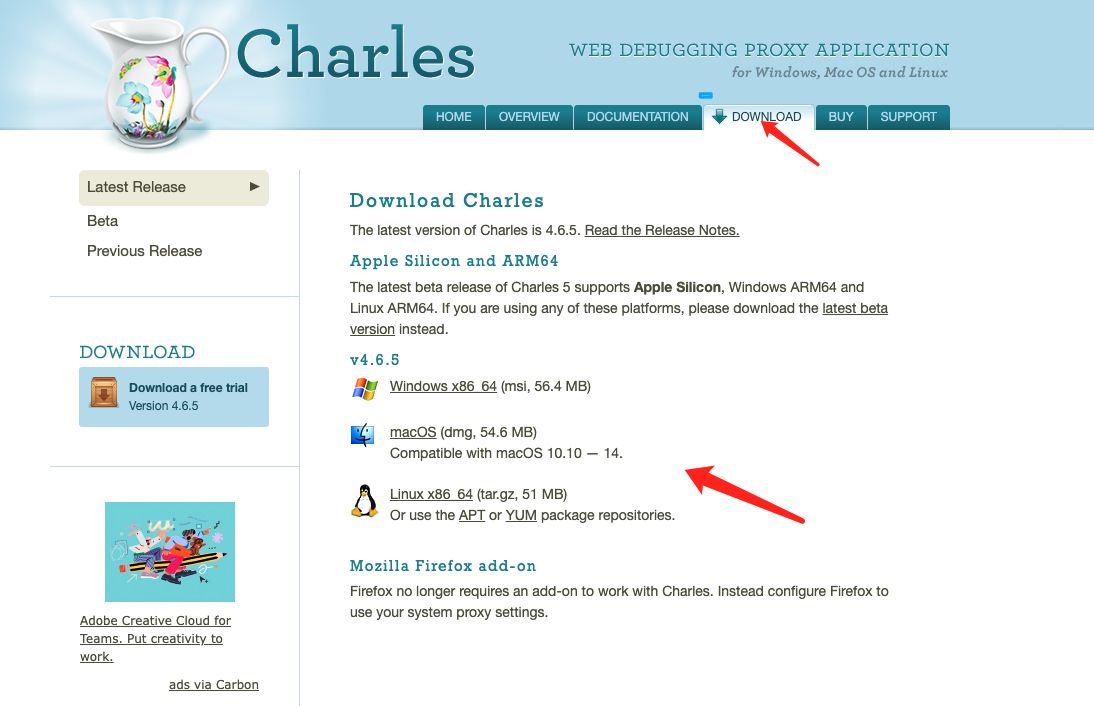
可以根据自己的电脑配置进行选择下载,以下是Chares官网下载地址,同时也提供了使用文档可以参考
You can choose to download according to your computer configuration. The following is the download address of Chares official website. It also provides usage documents for reference
下载地址:https://www.charlesproxy.com/download/
Download address: https://www.charlesproxy.com/download/
2.配置代理
Configure the proxy
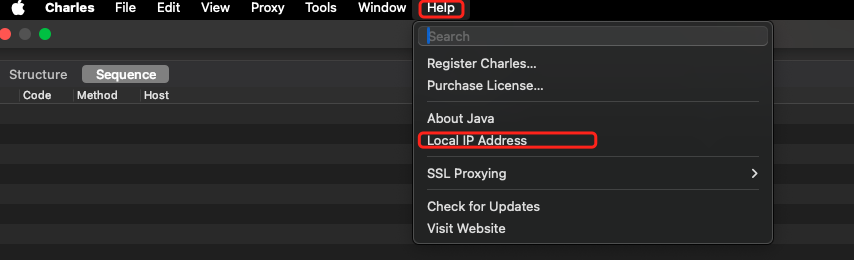
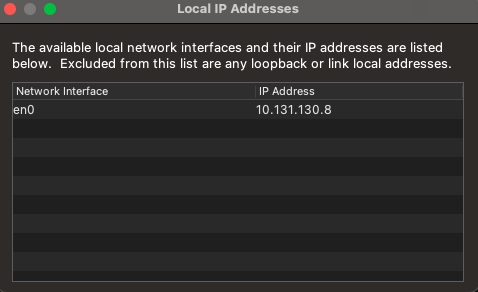
首先要知道电脑的IP和端口号,端口号默认是:8888,Charles-IP地址查看路径:Help->local IP Address(确保手机和电脑连接的是同一个WiFi)
First, you need to know the computer's IP and port number. The default port number is: 8888. Charles-IP address view path: Help->local IP Address (make sure the phone and computer are connected to the same WiFi)
以iOS手机举例,点击设置->WiFi->打开链接的WiFi->配置代理->选择手动->输入服务器IP(电脑的IP)端口号默认8888,点击保存如视频:
Take iOS phone as an example, click Settings->WiFi->Open the connected WiFi->Configure Proxy->Select Manual->Enter the server IP (computer IP) port number, the default is 8888, click Save as shown in the video:
3.手机证书安装
Mobile phone certificate installation
IOS手机打开Safari浏览器网址输入(一定要是连接代理的状态):chls.pro/ssl
Open the Safari browser on your iOS phone and enter the URL (it must be connected to a proxy): chls.pro/ssl
点击下载证书,下载完成后手机会提示去设置页面安装,下面是安装的视频:
Click to download the certificate. After the download is complete, the phone will prompt you to go to the settings page to install it. The following is a video of the installation:
安装完成后要点击关于手机->证书信任设置-点击信任刚刚安装的证书
After the installation is complete, click About Phone -> Certificate Trust Settings - click to trust the certificate just installed
Android手机需要单独对项目配置才可以抓包,代码如下(手机证书安装参考iOS流程类似):
Android phones need to configure the project separately to capture packets. The code is as follows (the mobile phone certificate installation process is similar to the iOS process):
1.res-xml下添加network_security_config文件,文件里面代码添加如下:
Add the network_security_config file under res-xml, and add the following code to the file:
<network-security-config>
    <base-config cleartextTrafficPermitted="true">
        <trust-anchors>
            <certificates src="system" />
            <certificates src="user" />
        </trust-anchors>
    </base-config>
</network-security-config>
2.需要在XML清单配置文件application下添加如下代码:
You need to add the following code under the XML manifest configuration file application:
android:networkSecurityConfig="@xml/network_security_config"4.抓包样例
Packet capture example
百度广告为例:
Take Baidu advertising as an example:
需要抓取域名为:mobads.baidu.com,选择要导出的域名右键导出如图选择:Export Session,导出文件为.chls 结尾的文件
The domain name to be captured is: mobads.baidu.com, select the domain name to be exported, right-click and select: Export Session as shown in the figure, and the exported file will be a file ending with .chls
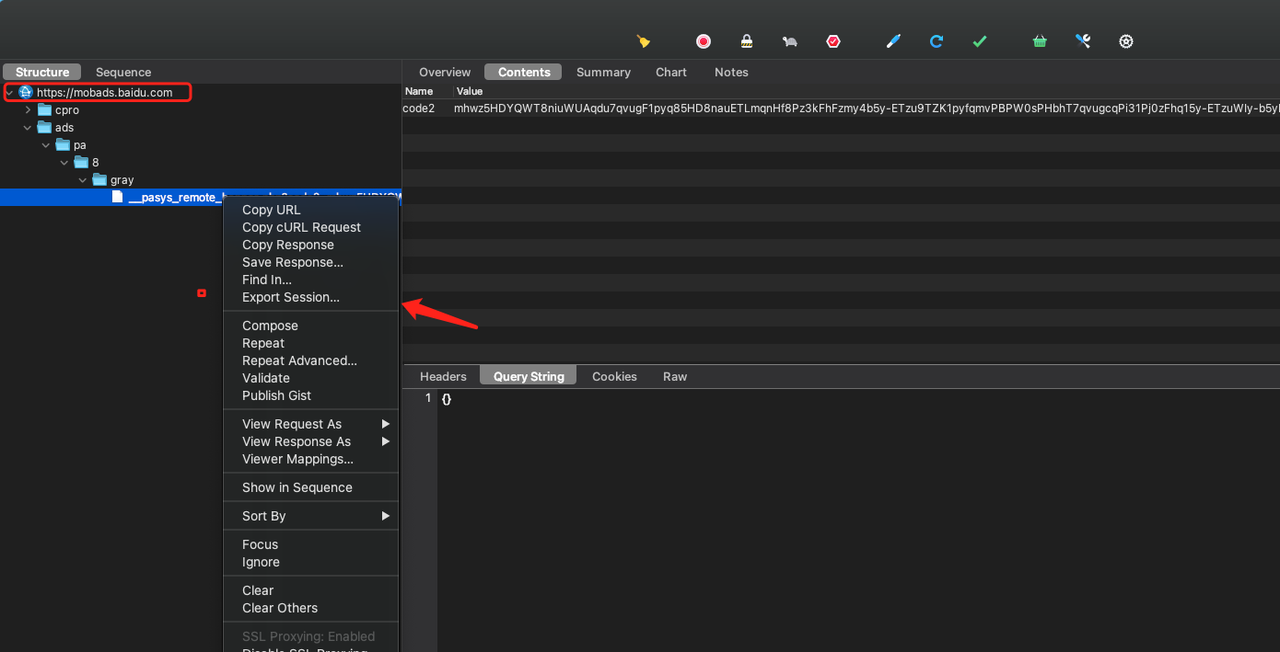
如果不清楚需要抓取哪个域名可以复现问题后导出全部如图:同样是.chls 结尾的文件
If you are not sure which domain name you need to grab, you can reproduce the problem and export all of them as shown in the figure: The same file ends with .chls
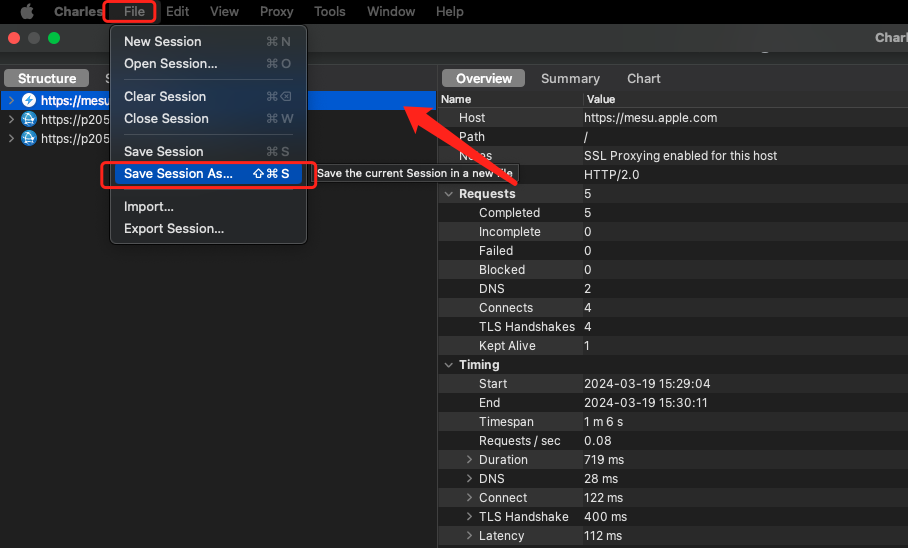
5.第三方广告网络域名介绍
Introduction to third-party advertising network domain names
优量汇:mi.gdt.qq.com
Tencent advertising:mi.gdt.qq.com
穿山甲抓包教程:https://www.csjplatform.com/supportcenter/5419
CSJ packet capture tutorial: https://www.csjplatform.com/supportcenter/5419
穿山甲抓包域名:
CSJ packet capture domain name:
- 3300及以上广告请求的域名为 :https://api-access./api/ad/union/sdk/get_ads/
The domain name for ad requests of 3300 and above is: https://api-access ./api/ad/union/sdk/get_ads/ - 3300以下版本:https://域名或IP/api/ad/union/sdk/get_ads/
Versions below 3300: https://domain name or IP address/api/ad/union/sdk/get_ads/
百度:mobads.baidu.com
Baidu advertising:mobads.baidu.com
快手:https://open.e.kuaishou.com/v3/open/univ
Kuaishou advertising:mobads.baidu.com